Part 3: But "I Play Games!" or "I Cant do that on Linux!"
As a gamer, I would say that there are some games that just do not work on linux. I agree. Kernel level anti cheat games will not work for most part; games such as: Battlefield 6, Multiplayer of GTAV, Rainbow Six Siege, etc. Now, I am not much of a multiplayer gamer as I get older; although I do enjoy a few games to play with the kids such as Palworld or The Finals - to which both play on Linux just fine.
Thanks to Valve with its proton layer development, and individuals like Glorious Eggroll with his Proton-GE or CachyOS with their modified proton layer, the amount of games that have become playable has grown considerably.
If you are curious as to the games you play and if they are playable on linux, two specific resources are very important:
https://www.protondb.com/

&
https://areweanticheatyet.com/

These two sites are extremely important resources to search up if your game is playable and many users also provide possible launch commands to place within Steam, Heroic or whatever you use to play your games on to make them stable.
But what about non gaming? Productivity (whatever that is)? Thankfully Microsoft made their office suite online with MS 365! Well, it sucks in my opinion and I use it for work so I am always annoyed. What are the alternatives?
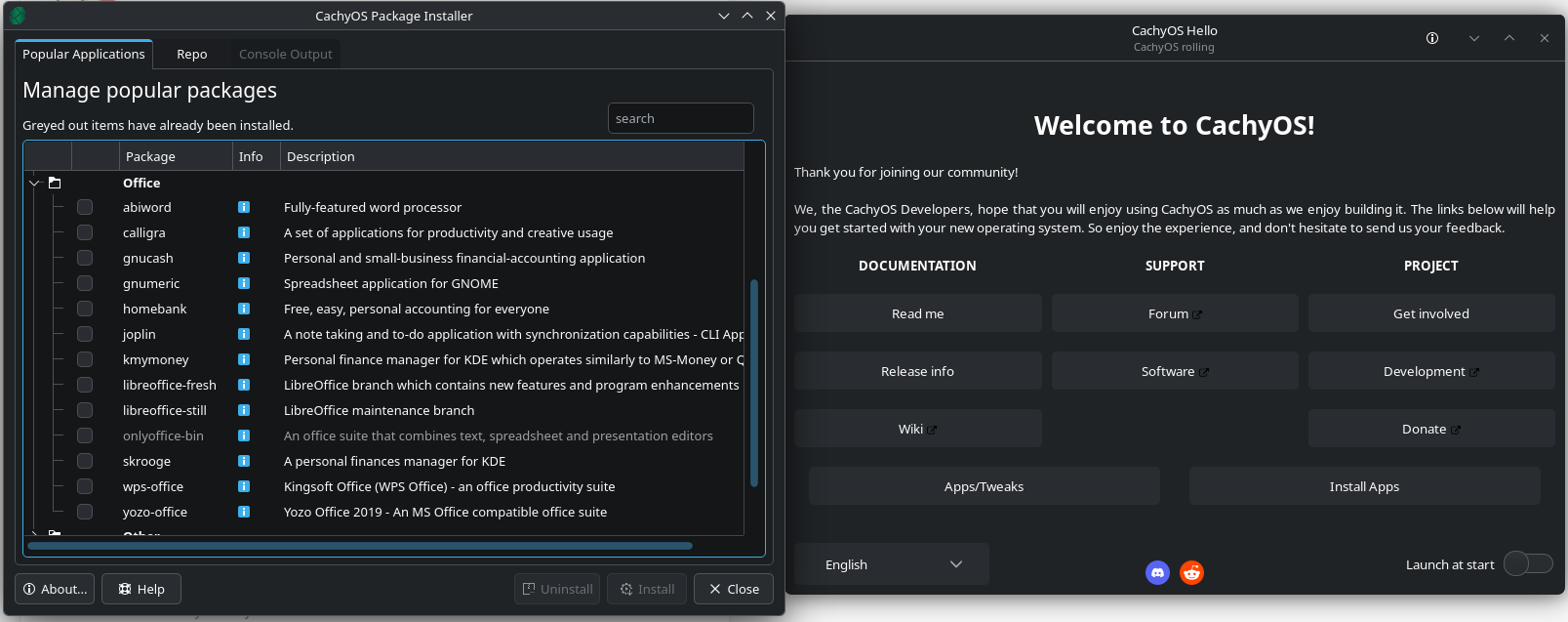
As you can see in this screenshot from the CachyOS Hello prompt for installing apps, there are a number of office software. Personally I use OnlyOffice as it is the one that mimics MS office the most. WPS Office is another good option and Libre Office seems to be most commonly used.
OK, thats all well and good but other productivity software? OBS? Photoshop? Premier Pro?
Well, this is where I am less knowledgeable on. OBS exists on Linux. You can either use a flatpak (containerized) version or you can use something more native like the one found within the same software package you see in image above. Discord works as well. But for adobe software suite, aside from using VM's running Windows in the background, there really isn't a native port as of now. Alternatively you can use GIMP but many people seem to have a disdaine for it. Krita is a great artwork based photo editor. For video editing, Davinci resolve and KDNELive are two pretty good video editors, but CapCut and Premier Pro are not on Linux as of writing this. So if this is a make or break situation for you, then sorry for the bad news. But Davinci Resolve is a very very good video editor that is growing in popularity and KDENLive is pretty good too. Going Back to Photo Editors, there is Affinity which I have done a quick guide on how to get it to work on Linux. But I have heard that Affinity is apparently working on a Linux port. So once that happens, then we got a fantastic photoshop alternative.
Below is a list of apps to use. Check to see if your distro has a native version of the app or if not, you can always try a flatpak version.
Video Editors
Photo Editors
Office Suites
I will continue to update this post (and thread) when I find more software that I suggest or something that works well or new developments.